Monday, November 10, 2014

What changes when we transfer funds between Asset Accounts?

The transfer is as follows:


With the following effect:


The database changes are:

** slots **
7|ded5efa287a34e862794b4277f8e0508|date-posted|10|0||0.0|||0|1|20140102
** splits **
47df2567833d70d7771c99b7dc47154e|ded5efa287a34e862794b4277f8e0508|6a86047e3b12a6c4748fbf8fde76c0c0|||n||-100000|100|-100000|100|
f8f99cf7d8974bcba4e07d4cb9cb9d3e|ded5efa287a34e862794b4277f8e0508|6b870a6ef2c3fbbff0ec6df32108ac34|||n||100000|100|100000|100|

** transactions **
ded5efa287a34e862794b4277f8e0508|be2788c5c017bb63c859430612e64093||20140101170000|20141111071603|Transfer

Okay, the usual suspects:

1. Add 1 row to transactions table
2. Add 2 rows to splits table
3. Add 1 row to slots table


Initiate accounts with some balance - Adding an Equity account

Before we can do anything, there must be some cash in these accounts. To start, let's give ourselves some equity.

1. First create an "Equity" type account named "Equity"

Here's how things should look after completion:


2. Then add 10,000 to the Cash account, matched with entry in Equity on 01-Jan-2014.


And the following are our balances:


And here's the changes to the database:

** slots **
6|04a6f5e65289295457ba0b24d2de69fd|date-posted|10|0||0.0|||0|1|20140101


** splits **
1eb24bc760ee0c99a54c2a3cd36798f7|04a6f5e65289295457ba0b24d2de69fd|6a86047e3b12a6c4748fbf8fde76c0c0|||n||1000000|100|1000000|100|
6e87026b4db7f5ce5658e8ea402cae8d|04a6f5e65289295457ba0b24d2de69fd|dedeaf05873d7e92aa2a31dba73704d5|||n||-1000000|100|-1000000|100|

** transactions **
04a6f5e65289295457ba0b24d2de69fd|be2788c5c017bb63c859430612e64093||20131231170000|20141111064545|Initial Balance
Notes
1. Slots table gets inserted with a "date-posted" entry -- huh? See here, and here.
2. A row gets added to the transactions table
3. Two rows gets added to the splits table

What happens when a child account is added to the Asset?

Here's the screen that adds the account:


Changes to the tables as follows:
** accounts **
6a86047e3b12a6c4748fbf8fde76c0c0|Cash|ASSET|be2788c5c017bb63c859430612e64093|100|0|f81bd224897ba77e5998139d7cc50be5|1001|Cash Account|0|0
** slots **
3|6a86047e3b12a6c4748fbf8fde76c0c0|color|4|0|Not Set|0.0|||0|1|
Again an account is added together with a corresponding slot. It is also a THB-denominated account so the "commodities" table did not expand.

What happens when a top-level Asset account gets added?

The following rows are added in various tables:

** accounts **
f81bd224897ba77e5998139d7cc50be5|Assets|ASSET|be2788c5c017bb63c859430612e64093|100|0|1d61881fa764645df6f203834c0c3030|||0|0
** commodities **
be2788c5c017bb63c859430612e64093|CURRENCY|THB|Baht|764|100|1|currency|

** slots **
1|f81bd224897ba77e5998139d7cc50be5|color|4|0|Not Set|0.0|||0|1|
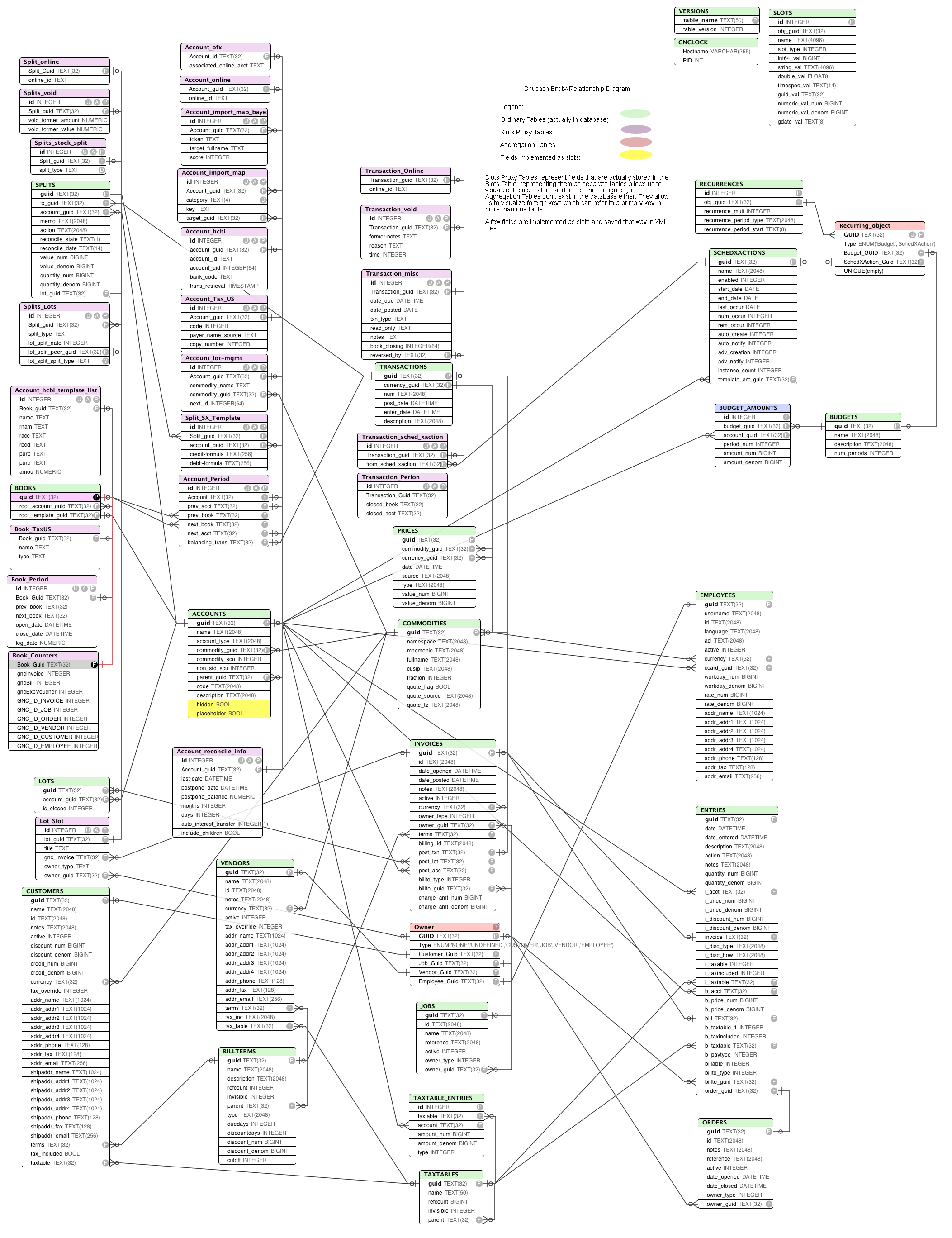
See http://wiki.gnucash.org/wiki/images/8/86/Gnucash_erd.png for the ER diagram for each table. Printing it out in color did much good for me.

1. No idea what "slots" table does.
2. Commodities table simply says that the account is of currency THB
3. We've added an Account named "Asset"

Dump the contents in a GnuCash file

Here's the perl code to dump the contents in a GnuCash file:

#!/usr/bin/env perl
# regc.pl - Reverse Engineer GnuCash

use strict;
use warnings;
use 5.10.0;
use DBI;
use Data::Dumper;

# Global Variables
my $gc_file = 'empty.gnucash';
my $dbh = DBI->connect("dbi:SQLite:dbname=$gc_file","","");

my $t = tables($gc_file);
say table_contents($t);

sub tables {
    my $file = shift;
    my $tables = [];

    my $res = `echo .schema | sqlite3 $file`;
    foreach my $t (split /;/, $res) {
        next unless $t =~ /CREATE TABLE (.*) \(/;
        push @{$tables}, $1;
    }
   
    return $tables;
}

# Given a list of tables, dump the contents of the tables to screen
sub table_contents {
    my $tables = shift;
    my $content = '';

    foreach my $t (sort @{$tables}) {
        $content .= "** $t **\n";
        my $sql = "SELECT * from $t;";
        my $res = `echo "$sql" | sqlite3 $gc_file`;
        $content .= $res . "\n";
    }
    return $content;
}

An empty GnuCash file has the following contents. Where double asterisks shows the table name:
** accounts **
1d61881fa764645df6f203834c0c3030|Root Account|ROOT||0|0||||0|0
d6b5387e81f169a5d4fbabca7130b9f4|Template Root|ROOT||0|0||||0|0

** billterms **

** books **
4e9e052c3dfc6c82d3f24f654ff80229|1d61881fa764645df6f203834c0c3030|d6b5387e81f169a5d4fbabca7130b9f4

** budget_amounts **

** budgets **

** commodities **

** customers **

** employees **

** entries **

** gnclock **
i3|6315

** invoices **

** jobs **

** lots **

** orders **

** prices **

** recurrences **

** schedxactions **

** slots **

** splits **

** taxtable_entries **

** taxtables **

** transactions **

** vendors **

** versions **
Gnucash|2041300
Gnucash-Resave|19920
accounts|1
books|1
budgets|1
budget_amounts|1
commodities|1
lots|2
prices|2
schedxactions|1
transactions|3
splits|4
billterms|2
customers|2
employees|2
entries|3
invoices|3
jobs|1
orders|1
taxtables|2
taxtable_entries|3
vendors|1
recurrences|2
slots|3
As you can see, this is Gnucash v2.4.13.

Getting a list of tables in GnuCash

Here's some perl code to show a list of tables in a GnuCash file:

#!/usr/bin/env perl
# regc.pl - Reverse Engineer GnuCash

use strict;
use warnings;
use 5.10.0;
use DBI;
use Data::Dumper;

# Global Variables
my $gc_file = 'empty.gnucash';
my $dbh = DBI->connect("dbi:SQLite:dbname=$gc_file","","");

say Dumper tables($gc_file);

sub tables {
    my $file = shift;
    my $tables = [];

    my $res = `echo .schema | sqlite3 $file`;
    foreach my $t (split /;/, $res) {
        next unless $t =~ /CREATE TABLE (.*) \(/;
        push @{$tables}, $1;
    }
   
    return $tables;
}
 The list of tables are:

          'gnclock',
          'versions',
          'accounts',
          'books',
          'budgets',
          'budget_amounts',
          'commodities',
          'lots',
          'prices',
          'schedxactions',
          'transactions',
          'splits',
          'billterms',
          'customers',
          'employees',
          'entries',
          'invoices',
          'jobs',
          'orders',
          'taxtables',
          'taxtable_entries',
          'vendors',
          'recurrences',
          'slots'

GnuCash E-R diagram

The ER diagram is located here:

http://wiki.gnucash.org/wiki/images/8/86/Gnucash_erd.png